Self-Hosting n8n in Production: Architecture & Costs
TL;DR
- Single-container n8n setups struggle with concurrent workflows, go unresponsive under load, and can lose credentials and binary files on redeploy.
- Decouple execution with PostgreSQL for persistence, Redis® / Render Key Value for the job queue, and dedicated n8n workers for parallel processing.
- Identify data-loss and downtime tolerance to decide between a single-instance topology or a distributed queue-mode architecture.
- Protect workflow execution at scale by configuring PostgreSQL connection pooling and offloading binary payloads to external object storage to prevent memory exhaustion.
- Secure your deployment on day one by establishing continuous Postgres backups and maintaining the exact cryptographic encryption key.
- Deploy this n8n architecture on Render from a single render.yaml Blueprint to get managed Postgres and Key Value, private networking, and env-managed secrets without running the infrastructure yourself.
Teams run self-hosted n8n when they need control over data, networking, and how workflows scale. That control comes with real operational work around databases, queues, and recoverability. Database bloat and background jobs at scale are the hard parts of production n8n. A managed stack on Render is how teams keep self-hosting without owning every layer themselves.
An n8n instance can run smoothly under normal workloads, then struggle with a surge of webhooks or a long-running AI agent workflow. The UI freezes, jobs die mid-run, or a redeploy wipes local state. Those failures are usually architecture, not “n8n isn’t ready for production.”
This guide details the architectural requirements for a production deployment and explains how to handle persistence and state. It also covers where a managed platform fits that stack and how to budget the Render services involved.
What production n8n architectures look like
Self-hosted n8n usually lands in one of two shapes. Single-instance runs the UI, scheduling, and workflow execution in one process (often with SQLite). Queue mode splits roles: a main node for UI and API, a Redis®-compatible broker for jobs, workers that execute workflows, and PostgreSQL for durable state.
Single-instance topology
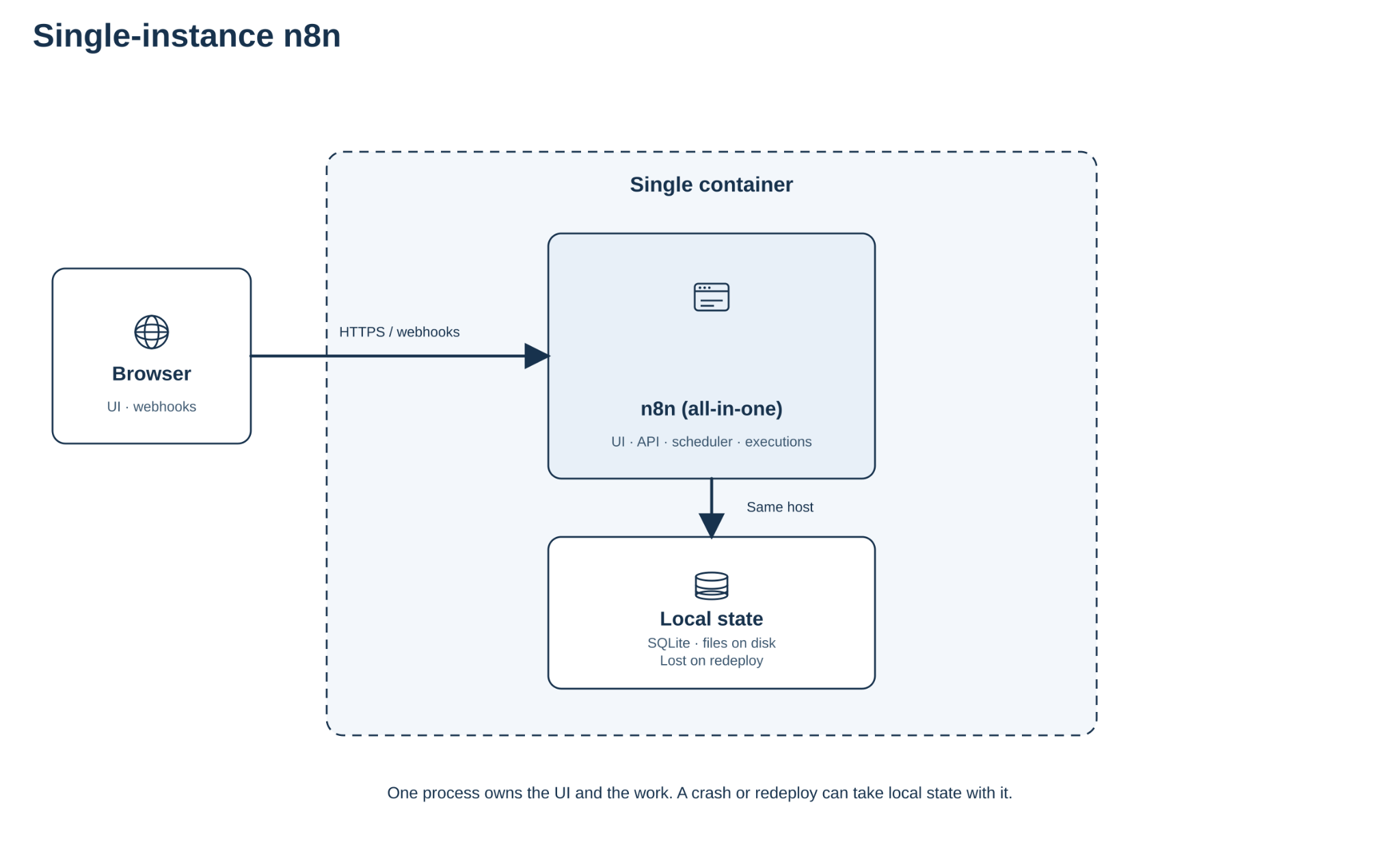
Use this for internal tests and low concurrency. It breaks down when webhooks spike, workers compete for one CPU, or the database becomes SQLite file-lock bound.
Queue-mode topology
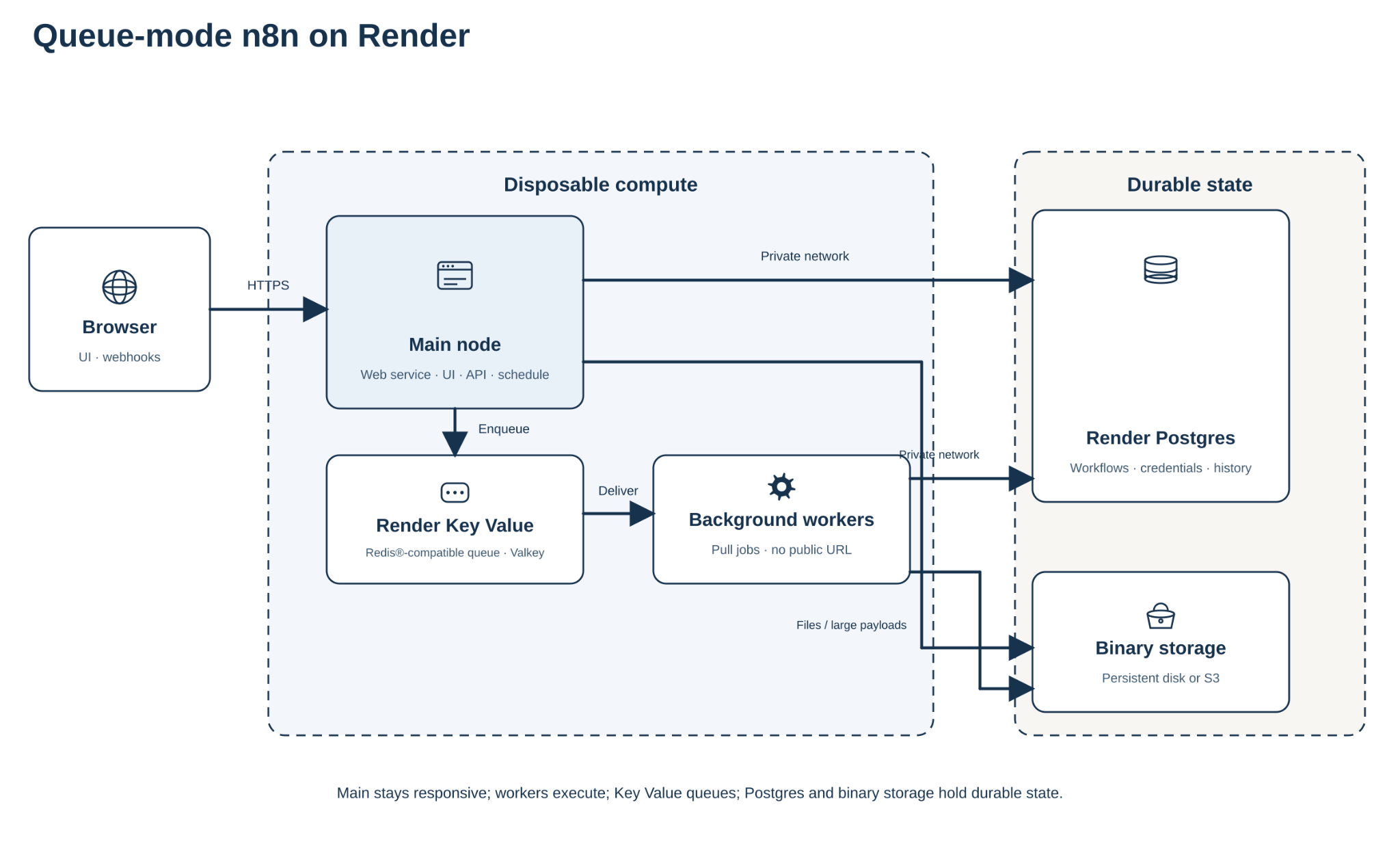
Use this when executions must run in parallel, the UI must stay responsive under webhook load, and credentials and history must survive redeploys.
What should you decide before choosing a topology?
Before you pick single-instance or queue mode, answer these questions:
- Persistence: Where do credentials, execution history, and binary files live across redeploys?
- Scalability: How many concurrent workflows and webhook RPS do you need at peak?
- Persistence: What data loss and downtime are acceptable during failure or deploy?
- Scalability: Do you need multiple workers, webhook processors, or more than one main node (n8n Enterprise)?
- Security baseline: What private networking, encryption-key, and datastore exposure rules apply?
- Ops overhead and cost shape: What budget, backup policy, and day-one ops will you actually run?
The comparison table below answers these by row.
How do you choose between single-instance and n8n queue mode?
Work through the checklist above, then use the tables below. On a single container without durable storage, a redeploy can wipe credentials and binary files sitting on the local filesystem.
The official Docker Compose example provides a single-instance setup. It handles execution and database management in one place: a reasonable starting point for internal testing but a single point of failure for mission-critical workflows.
To scale workflows reliably, enterprise deployments rely on n8n queue mode. This decouples the architecture by separating the Main Node (UI/API), a message broker, and stateless background workers that process jobs asynchronously.
A local docker run is fine for experiments, and a VPS with Docker Compose can run the same containers, but you inherit OS patching, volumes, backups, and scaling. n8n queue mode on Render keeps the same architectural shape while the platform runs the managed pieces:
| Concern | Local (docker run) | VPS (Docker Compose) | Render (queue mode) |
|---|---|---|---|
| Scalability | Single process; UI and jobs share one container | Manual: provision hosts, wire workers, and load balance yourself | Scale workers on CPU and memory without reshaping the app |
| Persistence | Ephemeral; credentials and binary files die with the container | DIY volumes and backup scripts | Managed Postgres, object storage for binaries, and env-managed encryption key |
| Ops overhead | Low until the first redeploy surprise | High: OS patches, firewall, backups, Compose drift | Low: stack defined in a Blueprint (render.yaml) |
| Security baseline | Exposed ports and self-managed secrets | Easy to misconfigure firewalls or public database ports | Private networking, managed TLS; set ipAllowList: [] to lock datastores |
| Cost shape | Cheap hardware, expensive failure modes | Spiky and easy to mis-size | Predictable services you can size per role |
That queue-mode stack maps onto Render like this:
| N8n component | Cloud primitive | Render service type |
|---|---|---|
| Main node | Persistent container | Web service |
| Background workers | Non-web daemon | Background worker |
| Database | Managed relational DB | Render Postgres |
| Message broker | In-memory key-value | Render Key Value |
| Binary storage | Object storage | S3 / Azure Blob (n8n Business or Enterprise) |
Worker concurrency (--concurrency) is how many workflows one worker runs at once. The right number depends on your load: peak parallel runs, and whether steps are mostly waiting on APIs (I/O) or burning CPU. n8n’s guidance is to prefer about 5 or higher per worker and to avoid many workers each set very low, which can exhaust the database connection pool and hurt throughput. Start from that floor, then raise or lower from metrics. I/O-heavy flows often tolerate higher concurrency. CPU-heavy or memory-heavy flows need lower caps so the pool does not run out of RAM. Match DB_POSTGRESDB_POOL_SIZE to the combined concurrency across workers.
Sending all production webhooks to the main node can slow the UI and API while those requests queue up. Prefer dedicated webhook processors: extra n8n processes started with the webhook command that take HTTP traffic so the main node can stay focused on the editor and schedules.
What does high availability require for the main node?
In queue mode, one process (the main node) serves the n8n UI and API and owns schedules and other non-HTTP triggers. Separate worker processes run the workflows. If that main process dies, people lose the editor and schedules stop, even when workers are still healthy. The control plane has a single point of failure. In-flight jobs already on workers are a different story.
You can run several main processes so the UI and API stay up if one main fails. n8n calls that multi-main. All of those mains stay live and share everyday traffic, while one of them is elected leader to run timers and pollers so those jobs do not double-fire. That live-together pattern is what people mean by active-active here. Turn it on with N8N_MULTI_MAIN_SETUP_ENABLED=true, put a load balancer in front that sticks each browser session to the same main instance, and point leadership at Redis-compatible storage (on Render: Key Value).
Multi-main is gated behind n8n’s self-hosted Enterprise license, a paid n8n product tier. It is not the same thing as Render’s Hobby, Pro, Scale, or Enterprise workspace plans.
On Render, keep a single main web service and scale with Background Workers, plus webhook-processor services if webhook volume calls for them. The main process serves the editor, the API, and schedules. Workers run the workflows, so capacity grows with the worker pool. Run more than one main only when the editor and schedules must stay up through a main-process failure. This guide’s production shape is one main plus scaled workers.
How should you manage persistence, state, and storage?
If credentials, binaries, or execution history live only on one container, a redeploy or a second worker can lose or fragment that data. Plan for these four:
- Workflow and execution records in the database
- The credential encryption key
- Binary and external execution data
- Deployment settings
On Render, keep N8N_ENCRYPTION_KEY in environment variables (or Blueprint env) and back it up with the database. Without the exact key, restored credentials will not decrypt.
Which database should you choose: Postgres or SQLite?
Self-hosted n8n defaults to SQLite, which is fine for light single-instance tests. Queue mode and higher concurrency need PostgreSQL. n8n supports PostgreSQL versions 16, 17, and 18.
As you add workers, watch database connections. Set DB_POSTGRESDB_POOL_SIZE for the total concurrency across the worker pool so you do not run out of connections.
Prefer a database instance with steady CPU. Burstable plans slow down when CPU credits run out, which shows up as latency and workflow timeouts.
On Render, use Render Postgres for that role. Prefer a paid instance with dedicated CPU for production, and use automated backups / PITR instead of DIY dumps on a VPS.
Why is a Redis® message broker required?
Although Postgres effectively handles queues for many modern applications, n8n enforces a strict architectural constraint. Its backend is hardcoded to use a queue system supporting the Redis protocol as its underlying message broker.
A single, unmanaged Redis®-compatible instance operates as a single point of failure in queue mode. A managed Render Key Value instance (Redis®-compatible, Valkey on new instances) covers the broker role. Put it in the same region as the web and workers so traffic stays on the private network. Set ipAllowList: [] if you want the datastore locked to private access only.
How do you externalize binary data to prevent memory exhaustion?
n8n does not support using a local filesystem for binary data in a distributed setup. If Worker A downloads a file, Worker B can't access it on an isolated filesystem. Forcing massive payloads into PostgreSQL rapidly bloats the database volume and exhausts connection pools.
Heavy webhooks frequently trigger OOM errors in the message broker. The Webhook Response Relay defaults to a 64 MiB payload limit. The broker, however, requires budgeting roughly 1.5x this value in memory for each response currently in flight.
For production, offload binary data to an external object storage service. n8n retains only a lightweight pointer in PostgreSQL, drastically reducing memory consumption.
n8n supports AWS S3 and Azure Blob Storage for external binary data on self-hosted Business or Enterprise plans. Other S3-compatible providers may work with the S3 settings, but n8n does not officially support them.
Point n8n at AWS S3 or Azure Blob and pass the credentials as environment variables on the web service and workers.
Beyond binary payloads, pruning database execution history is necessary. Retaining logs indefinitely degrades query performance, particularly for AI agents handling large conversational context windows. Operators should keep EXECUTIONS_DATA_PRUNE=true (the default) and set EXECUTIONS_DATA_MAX_AGE (e.g. 336 hours) so old execution history clears automatically.
Why Render fits production n8n workloads
Use the checklist above to decide single-instance vs queue mode. High concurrency, low downtime tolerance, or durable credentials and binaries across redeploys usually points to queue mode. When that is the answer, Render maps each role to a managed service so you do not own OS patching, volume backups, or Kubernetes manifests on a traditional VPS.
Define the queue-mode stack once as a Blueprint (render.yaml). That file typically declares:
- A web service for the main node (UI, API, scheduling)
- Background workers that pull jobs from the queue
- Render Postgres for workflows, credentials, and execution history
- Render Key Value as the Redis®-compatible broker
- External object storage (S3 or Azure Blob) for binary data
Services in the same region talk over the private network. Set ipAllowList: [] on Render datastores to block public access (omit it and Postgres allows all IPs). Field-level detail lives in the Blueprint spec.
If you need an air-gapped hyperscaler deployment or already run production on AWS EKS, stay on that path. For teams that want the queue-mode shape without a full platform-ops bench, deploy it on Render.
How to budget self-hosted n8n on Render
Price the Blueprint stack above as separate services, not one n8n meter:
Render monthly ≈ workspace plan + main web + Σ workers + Postgres + Key Value
Object storage (S3 or Azure Blob) and n8n Business or Enterprise licenses sit outside that sum.
What usually moves the bill:
- Add or enlarge workers when concurrent executions and webhooks climb.
- Grow Postgres storage and plan size as history grows (and when binaries stay in the DB).
- Size the main web service for UI and API availability, not peak job CPU.
- Key Value is usually a small line item next to workers and Postgres once the broker is managed.
Starter: one web, one or two workers, managed Postgres, Key Value, external object storage. Scaled: more workers and a larger Postgres plan before you resize the main node.
Look up each service’s instance type on Render pricing (plan IDs in compute plans). n8n Community is free software. n8n Business or Enterprise fees are on n8n pricing.
Conclusion
Running n8n in production means moving off a single lightweight container when concurrency and uptime matter. Queue mode splits the UI and schedules onto a main node and puts workflow runs on workers, with Postgres and a Redis-compatible broker holding state and jobs.
Put workflow data in Postgres, the job queue in Redis-compatible storage, and large files in object storage so the database and workers do not run out of memory under load. Keep Postgres and N8N_ENCRYPTION_KEY backed up together.
Deploy that shape on Render for managed services and private networking. Start building on Render for free.
Frequently asked questions
When should I switch n8n to queue mode?
Switch to n8n queue mode when scaling mission-critical workflows or handling heavy enterprise webhooks that cause single-server instances to crash. This distributed setup decouples your architecture into a main UI node, background workers, and a Redis message broker, preventing out-of-memory errors during concurrent executions and intensive AI loops.
Can I run n8n queue mode without Redis?
You cannot run a distributed n8n architecture without a Redis®-compatible store because the backend is hardcoded to use a queue system supporting the Redis protocol. A PostgreSQL-only queue implementation is unsupported. You need a highly available, managed Redis®-compatible broker. On Render that is Key Value (Valkey on new instances).
Can I use SQLite for n8n in production?
SQLite and PostgreSQL serve different purposes. SQLite works for lightweight single-instance tests, but its file-locking mechanism bottlenecks concurrent executions. Production queue mode needs PostgreSQL versions 16, 17, or 18 alongside strict connection pool management for distributed workers.
What database and storage does self-hosted n8n need?
A production deployment requires PostgreSQL for workflow persistence, a Redis-compatible broker for job queuing, and external object storage for binary payloads.
Why is my n8n database growing so fast?
Your database bloats rapidly when forcing massive binary payloads into PostgreSQL and indefinitely retaining historical workflow execution logs. To prevent memory exhaustion and degraded query performance, offload binary data to an external object storage service like AWS S3. Pruning is on by default. Set EXECUTIONS_DATA_MAX_AGE (and optionally a max count) so old records clear on a schedule you choose.
How do I back up n8n credentials?
Back up the exact N8N_ENCRYPTION_KEY value with your PostgreSQL backups. n8n encrypts stored credentials with that key. If you restore the database without the same key, logins and credentials will not decrypt, and the restore will not be usable.
How much does it cost to self-host n8n?
Self-hosting costs combine n8n software licensing with the infrastructure you run. n8n Community Edition is free. n8n Business and Enterprise are separate fees to n8n. On Render you pay for declared services (web, workers, Postgres, Key Value), not a per-execution hosting meter. Look up instance types on Render pricing (plan IDs in compute plans) and software fees on n8n pricing. For a walkthrough of how Render bills workspaces, compute, and storage, see cloud application hosting costs.